

BOB 5.3.0
Moderator: Tech Team
Forum rules
Please read the Community Guidelines before posting.
Please read the Community Guidelines before posting.
-
BigBallinStalin

- Posts: 5151
- Joined: Sun Oct 26, 2008 10:23 pm
- Location: crying into the dregs of an empty bottle of own-brand scotch on the toilet having a dump in Dagenham
- Contact:
Re: BOB 5.2.4
Just wanted to stop by and thank everyone who has been involved in updating BOB and helping others use it. What an awesome script!

Re: BOB 5.2.4
I did this but Greasemonkey remained in the Firefox browser after the re-install. In any case I tried to install BOB and this time when I hit "new user script" and then "use script from clipboard" it put the copied text into the wordpad vessel; this did not happen last time. However, now I don't know what to do from here. Do I save this wordpad file to my computer?ender516 wrote:Well, perhaps you should try what dana1971 did, and reinstall Firefox, Greasemonkey, and BOB.

Re: BOB 5.2.4
I think that the file is already in place at that point, and the editor is just there in case you want to customize the script. I think if you close wordpad without doing anything else, you should be good to go.Abyss24 wrote:I did this but Greasemonkey remained in the Firefox browser after the re-install. In any case I tried to install BOB and this time when I hit "new user script" and then "use script from clipboard" it put the copied text into the wordpad vessel; this did not happen last time. However, now I don't know what to do from here. Do I save this wordpad file to my computer?ender516 wrote:Well, perhaps you should try what dana1971 did, and reinstall Firefox, Greasemonkey, and BOB.
-
thenobodies80

- Posts: 5400
- Joined: Wed Sep 05, 2007 4:30 am
- Gender: Male
- Location: Milan
Re: BOB 5.2.4
BOB has a problem to handle bonus collections --> http://www.conquerclub.com/forum/viewto ... 5#p4090627
Probably the issue is with type="mandatory"
Probably the issue is with type="mandatory"
Re: BOB 5.2.4
This is what I was coming to post about.thenobodies80 wrote:BOB has a problem to handle bonus collections --> http://www.conquerclub.com/forum/viewto ... 5#p4090627
Probably the issue is with type="mandatory"
Re: BOB 5.2.4
On July 7, 2009 there was a comment in this post about hovering the mouse over a tert and seeing:
"Territories on the map: Highlight (with a certain convention) the territories that border this territory.
6 different options atm: Border (2-way attack), attack-only, defend-only, bombard, bombarded by, mutual bombard"
I see the six different conventions on the map, but don't have a key to tell me what is what. Some I have figured out and some I think i know, but I would like to be certain. Does someone have the map legend/key?
Thanks!!
"Territories on the map: Highlight (with a certain convention) the territories that border this territory.
6 different options atm: Border (2-way attack), attack-only, defend-only, bombard, bombarded by, mutual bombard"
I see the six different conventions on the map, but don't have a key to tell me what is what. Some I have figured out and some I think i know, but I would like to be certain. Does someone have the map legend/key?
Thanks!!
Re: BOB 5.2.4
Well, the help page for BOB, although out of date, included this (I think). However, that is a dead link now, so we should see about recovering and rehosting that. (It would likely be best to embed in BOB itself.) However, all is not lost. In addition to the markers on the map, there is a small region of text on the Game Page entitled Map Inspect. It is just below the My Spoils line, which is below the Game Type, etc., which is directly below the map image. When you are hovering, not only do icons appear on the map, the name of the territory over which you are hovering appears after the words "Map Inspect:" and below that, those same icons appear with an explanatory keyword like "Borders" and the list of territories in that category, with the number of troops on each territory as well.dt03457 wrote:On July 7, 2009 there was a comment in this post about hovering the mouse over a tert and seeing:
"Territories on the map: Highlight (with a certain convention) the territories that border this territory.
6 different options atm: Border (2-way attack), attack-only, defend-only, bombard, bombarded by, mutual bombard"
I see the six different conventions on the map, but don't have a key to tell me what is what. Some I have figured out and some I think i know, but I would like to be certain. Does someone have the map legend/key?
Thanks!!
Re: BOB 5.2.4
ender516,
LOL...Thanks!!! I must be blind as i have never noticed the "Map Inspect:" before, or if I did, I totally ignored it. That works perfectly. Thanks for the tip, it will certainly help me a great deal on some of the maps I play
LOL...Thanks!!! I must be blind as i have never noticed the "Map Inspect:" before, or if I did, I totally ignored it. That works perfectly. Thanks for the tip, it will certainly help me a great deal on some of the maps I play

Re: BOB 5.2.4
OK... what up with the link in post 1 to download BOB??
All I get is a bunch of adware and crap.... no BOB.
Is there a different source than the link that is going to take me an hour to clean off my computer?
All I get is a bunch of adware and crap.... no BOB.
Is there a different source than the link that is going to take me an hour to clean off my computer?
Re: BOB 5.2.4
When you get to the userscripts.org page for BOB, be sure to click the Install button in the top right corner. Don't be fooled by enormous "Download Now" buttons that are in fact ads. (I think they are labelled as ads, but it can be hard to spot.)
Perhaps we should change the link from the /show/ form to the /install/ form.
Perhaps we should change the link from the /show/ form to the /install/ form.
Re: BOB 5.2.4
Thanks... figured it out. Thought I was savvy enough to avoid those kinds of things, but nooooo...ender516 wrote:When you get to the userscripts.org page for BOB, be sure to click the Install button in the top right corner. Don't be fooled by enormous "Download Now" buttons that are in fact ads. (I think they are labelled as ads, but it can be hard to spot.)
Perhaps we should change the link from the /show/ form to the /install/ form.

Got BOB, up and running. Very cool, now I just have to sort out what everything is...
-
Crazyirishman

- Posts: 1564
- Joined: Sun Jan 04, 2009 8:05 pm
- Gender: Male
- Location: Dongbei China
Re: BOB 5.2.4
BOB, clickies, and assault odds all stopped working on me last night, I tried uninstalling and reinstalling everything, but to no avail
Re: BOB 5.2.4
You didn't accidentally disable Greasemonkey, did you? Have you tried reinstalling it?
-
Crazyirishman
- Posts: 1564
- Joined: Sun Jan 04, 2009 8:05 pm
- Gender: Male
- Location: Dongbei China
Re: BOB 5.2.4
Yes I checked to see if I accidentally disabled it, but it was enabled. I then uninstalled and reinstalled greasemonkey but the add ons still aren't working for me. Every time I try to download I just get the script page and the code used for the code.ender516 wrote:You didn't accidentally disable Greasemonkey, did you? Have you tried reinstalling it?
Re: BOB 5.2.4
Does this happen for all scripts, or just BOB?Crazyirishman wrote:Yes I checked to see if I accidentally disabled it, but it was enabled. I then uninstalled and reinstalled greasemonkey but the add ons still aren't working for me. Every time I try to download I just get the script page and the code used for the code.ender516 wrote:You didn't accidentally disable Greasemonkey, did you? Have you tried reinstalling it?
EDIT:
A quick thought: go to the Firefox Options dialog and open the Applications panel. Check the content types to see if something is set for Javascript files (.js, .user.js, text/javascript, ...) I'm not sure how it might appear, as there is nothing in there on my machine, but that is the point: my downloads work - Greasemonkey puts up a dialog which does a three second countdown, then enables the Install button. If you are not seeing this, then something is keeping Greasemonkey from working on the file, and it may be in that Applications panel.
-
Crazyirishman
- Posts: 1564
- Joined: Sun Jan 04, 2009 8:05 pm
- Gender: Male
- Location: Dongbei China
Re: BOB 5.2.4
All scripts that I tried: BOB clickies, map rank, and assault odds.ender516 wrote:Does this happen for all scripts, or just BOB?Crazyirishman wrote:Yes I checked to see if I accidentally disabled it, but it was enabled. I then uninstalled and reinstalled greasemonkey but the add ons still aren't working for me. Every time I try to download I just get the script page and the code.ender516 wrote:You didn't accidentally disable Greasemonkey, did you? Have you tried reinstalling it?
Re: BOB 5.2.4
Whoops, didn't see you were on line. Check my edit above.
-
Crazyirishman
- Posts: 1564
- Joined: Sun Jan 04, 2009 8:05 pm
- Gender: Male
- Location: Dongbei China
Re: BOB 5.2.4
Thanks for the info, but I checked the applications tab and there was nothing for anything javascript related files. Im not sure what would stop greasmonkey from doing that, as I only have a few things in that tab.ender516 wrote:A quick thought: go to the Firefox Options dialog and open the Applications panel. Check the content types to see if something is set for Javascript files (.js, .user.js, text/javascript, ...) I'm not sure how it might appear, as there is nothing in there on my machine, but that is the point: my downloads work - Greasemonkey puts up a dialog which does a three second countdown, then enables the Install button. If you are not seeing this, then something is keeping Greasemonkey from working on the file, and it may be in that Applications panel.
Re: BOB 5.2.4
All I can suggest at this point is to start eliminating other add-ons and plugins from Firefox. Alternatively, you could set up a fresh profile in Firefox and work your way up.
-
Crazyirishman
- Posts: 1564
- Joined: Sun Jan 04, 2009 8:05 pm
- Gender: Male
- Location: Dongbei China
Re: BOB 5.2.4
Thanks I committed the great purge of firefox and was able to get everything back. I'm still not sure what the issue was because all me plugins were intact, but I guess that doesn't matter now.ender516 wrote:All I can suggest at this point is to start eliminating other add-ons and plugins from Firefox. Alternatively, you could set up a fresh profile in Firefox and work your way up.
Re: BOB 5.2.4
I didn't want to propose a full reinstall of Firefox, but I'm glad it worked out.
-
anamainiacks

- Posts: 1778
- Joined: Sat Mar 03, 2007 9:21 am
- Gender: Male
Re: BOB 5.2.4
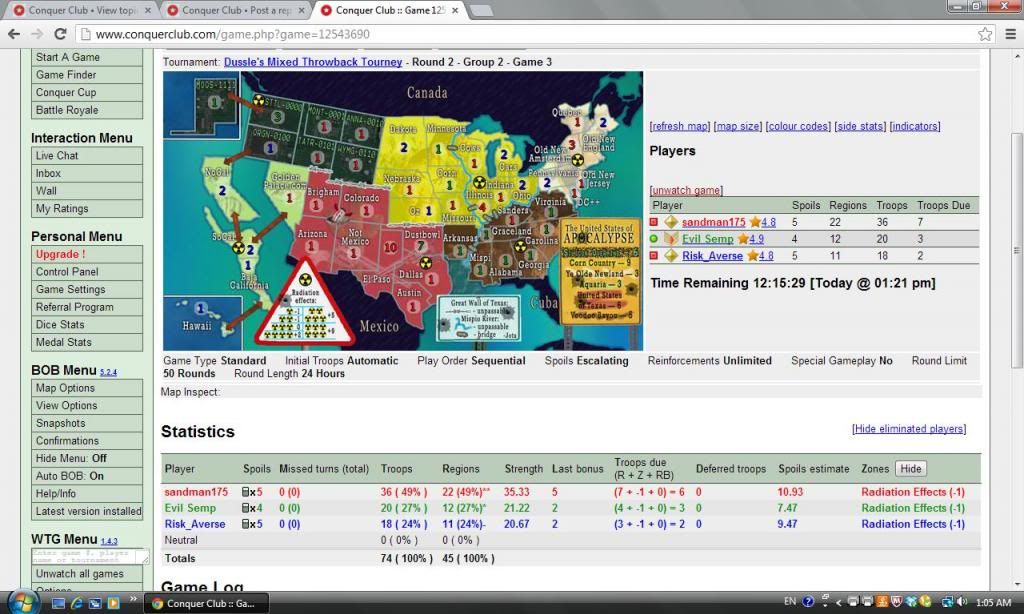
I noticed that on USApocalypse, BOB says that 3 radiated territories gives -1 troops, when it should really be 0 troops. Not sure if this has been raised before, but is this a glitch?

Re: BOB 5.2.4
Do you have an example game or a screenshot?
-
anamainiacks
- Posts: 1778
- Joined: Sat Mar 03, 2007 9:21 am
- Gender: Male
Re: BOB 5.2.4
Game 12543690.ender516 wrote:Do you have an example game or a screenshot?
sandman175 is holding Dallas, Illinois and Old New Amsterdam.
BOB shows "Radiation Effects (-1)", and troops due as 6.
CC's stats correctly lists it as 7.
- Click image to enlarge.
Re: BOB 5.2.4
Hmm, apparently the XML on this map has been modified recently in order to take advantage of the new collections feature which provides progressive bonuses for holding varying numbers of territories in a bonus zone. Previously there was a complicated interlocking set of continents which provided the peculiar progression of values. Now the code is simpler, but at first glance I am not convinced that it is equivalent to the old code or that it provides the numbers listed on the map legend. I will investigate further and let you know what I find.
EDIT:
Okay, since this XML has been up for a month at least, if the bonuses were not working properly, there would have been a great hue and cry, and what I read in the XML Guide has straightened me out (when all else fails, RTFM). So the problem is that BOB does not understand how to report collections. Okay, that goes on the list of things to fix.
EDIT:
Okay, since this XML has been up for a month at least, if the bonuses were not working properly, there would have been a great hue and cry, and what I read in the XML Guide has straightened me out (when all else fails, RTFM). So the problem is that BOB does not understand how to report collections. Okay, that goes on the list of things to fix.